ROS 2 TurtleBot4 Text Drawing Robot (Simulation + UI + Mobile Control)
🚀 Turn Text into Motion with Autonomous Robotics!
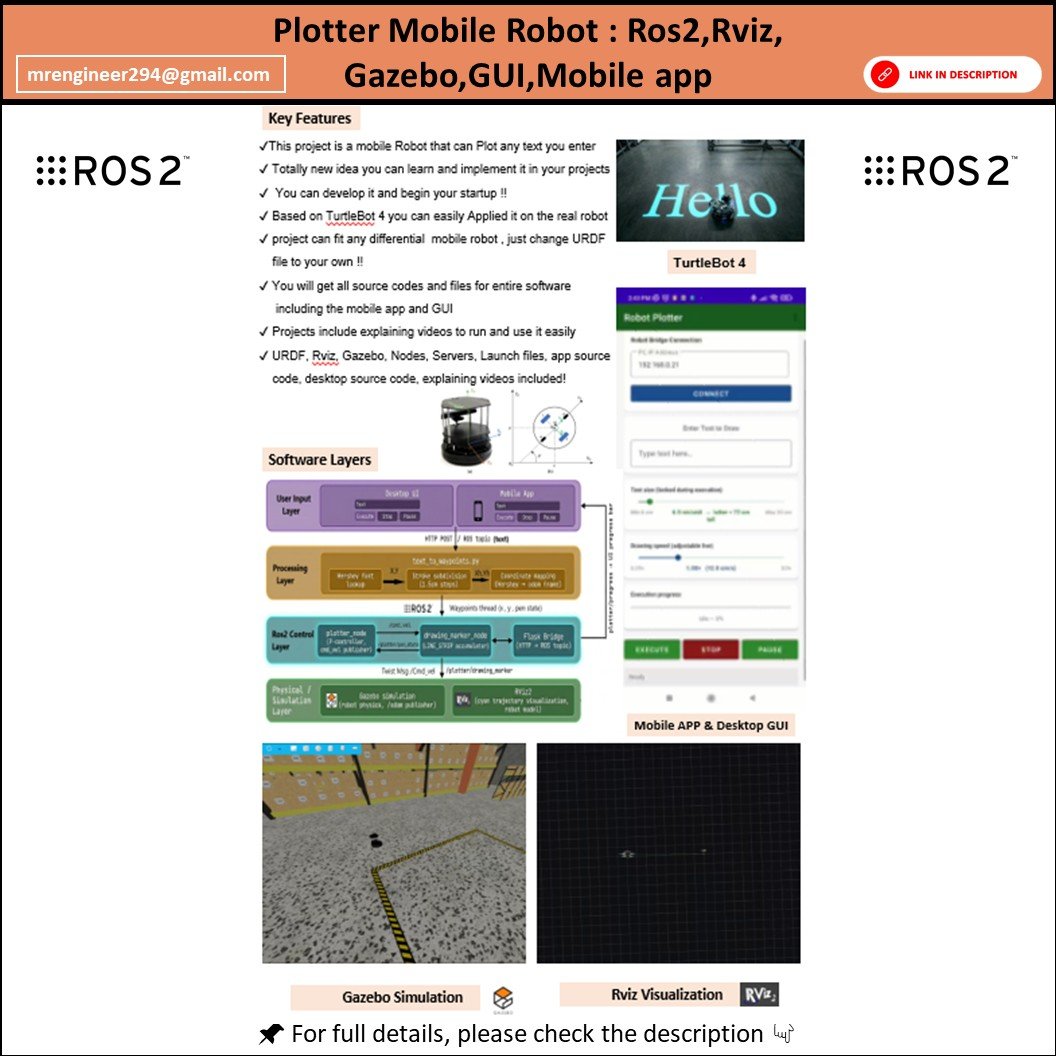

Build and control a fully simulated robot that can draw any text you enter using ROS 2, Gazebo, and RViz2. This project combines robotics, control, and UI development into one powerful and sellable system.
🎯 What This Project Does
- Convert user-input text into robot motion
- Autonomous path generation for drawing characters
- Real-time visualization in Gazebo + RViz2
- Desktop UI + Mobile App control
- Fully integrated with ROS 2 ecosystem
🔥 Key Features
- ✨ Text-to-Trajectory Conversion Algorithm
- 🤖 TurtleBot4 Simulation in Gazebo
- 🧭 Navigation using ROS 2 Nav2 Stack
- 📡 Live Visualization in RViz2
- 💻 Desktop GUI (PyQt5)
- 📱 Mobile App Control (Flask Server)
- ⚙️ Custom ROS 2 Package:
robot_plotter - 🧠 Smart path execution and smooth motion
🧰 Technologies Used
- ROS 2 Humble Hawksbill
- Gazebo
- RViz2
- TurtleBot4
- Python
- Flask
- PyQt5
💻 System Requirements
| Requirement | Minimum | Recommended |
|---|---|---|
| OS | Ubuntu 22.04 | Ubuntu 22.04 |
| ROS 2 | Humble | Humble |
| RAM | 8 GB | 16 GB |
| Storage | 20 GB | 40 GB |
| GPU | Integrated | Dedicated |
📦 What You Will Get
- ✅ Complete ROS 2 Workspace
- ✅
robot_plotterPackage (Source Code) - ✅ Gazebo World & Models
- ✅ Launch Files (One-click run)
- ✅ Desktop GUI Application
- ✅ Mobile Control App (APK)
- ✅ RViz Configuration File
- ✅ Step-by-Step Installation Guide
- ✅ Troubleshooting Guide
⚙️ How It Works
- Launch the simulation
- Enter text in GUI or mobile app
- Robot converts text → path
- TurtleBot4 draws it in Gazebo
- View live in RViz2
🛠 Troubleshooting Included
- TurtleBot packages missing
- Gazebo not opening
- Build errors
- Flask / PyQt issues
- Mobile connection fixes
🎓 Who This Project Is For
- Robotics Students
- ROS 2 Beginners to Advanced
- Final Year Projects
- Researchers & Developers
- Freelancers & Engineers
💡 Why This Project is Valuable
- Combines ROS + UI + Simulation + Networking
- Unique concept (Text → Robot Motion)
- Ready-to-use & expandable
- Perfect for portfolio, research, and selling
📈 Use Cases
- Robotics learning
- Academic submissions
- Demo presentations
- YouTube content
- Freelance services
⭐ Bonus Value
- Clean and structured code
- Easy to customize
- Real-robot ready architecture
📩 Support
Full guidance included. Easy to follow even if you're new to ROS 2.
🔥 Stand Out with This Project
This is not just a simulation — it’s a complete robotics system combining control, UI, and autonomy.